A cleaner app asks for access to your photos, which is the most personal thing on your phone. Most are fine, but a few habits tell you which. Check these seven things.
1. Where are your photos analyzed?
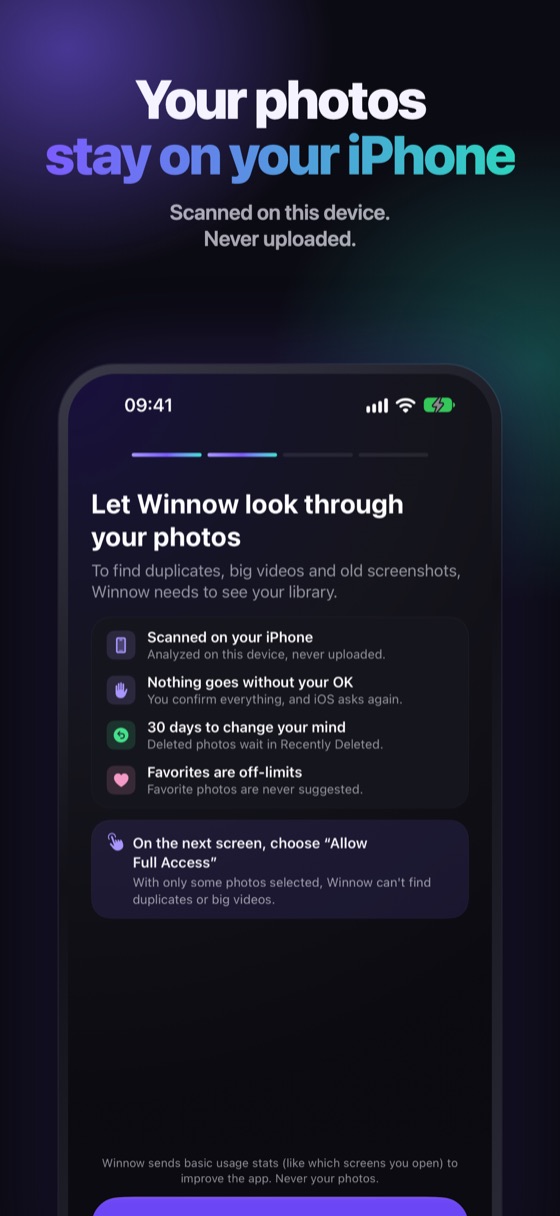
Ask whether the analysis happens on your iPhone or in the cloud. If photos are uploaded to find duplicates, you are handing them to a server. A safe app says clearly that your photos never leave the device.
2. What access does it ask for?
iOS lets you give access to all photos or to a selection. A cleaner needs your whole library to find duplicates, but it should not ask for contacts, location or the microphone for no reason.
3. Does it explain each suggestion?
"Delete these 4,000 photos" is a red flag. A good app tells you why each photo is suggested and lets you review before anything goes.
4. Does it ask you to confirm every delete?
Deleting photos in iOS always shows a system confirmation. Be wary of any app that claims to delete things silently.
5. Can you undo a mistake?
Deleted photos go to Recently Deleted and stay there for 30 days. A safe app works with that, and never touches your Favorites or the last copy of a photo.
6. What does it cost, in plain terms?
Check the price and renewal terms on the App Store page before you subscribe. Subscriptions renew automatically unless you cancel 24 hours before the period ends, and you can manage them in Settings › Apple ID › Subscriptions.
7. What does the privacy label say?
Every App Store page has an App Privacy section. Read it: it lists what data the app collects and whether it is linked to you or used to track you. An app that says it collects nothing but asks for tracking deserves a second look.
Winnow analyzes your photos on your iPhone and never uploads them. It collects app usage data to improve the app and, only if you allow tracking, to measure which ads bring people to it. The details are on its App Store privacy label.
What Winnow does on each of the seven
Photos are analyzed on your iPhone and never uploaded. Every suggestion has a reason. You confirm in the iOS sheet before anything is deleted. Everything you delete waits 30 days in Recently Deleted. At least one photo of every similar group always stays, and Favorites and protected photos are never suggested. No ads, no account.
FAQ
Are iPhone cleaner apps safe?
Many are, if they analyze photos on the device, explain each suggestion, ask you to confirm every delete and work with Recently Deleted. Check the privacy label before you install.
Can a cleaner app access my photos without me knowing?
No. iOS asks for permission first and lets you choose all photos or a selection. You can change it later in Settings › Privacy & Security › Photos.
Do cleaner apps really free space?
They free space by helping you delete what is big or repeated. Nothing they do beats deleting it, so choose one that shows the real amount before you delete.