Duplicates pile up fast: a burst of ten frames, three takes of the same group photo, a picture saved from a chat and also kept in your camera roll. None of them is big, but together they take a lot of room.
Exact duplicates: use the Duplicates album
On iOS 16 and later the Photos app has a Duplicates album. Open Photos › Albums, scroll to Utilities and tap Duplicates. Each pair has a Merge button that keeps the best version and moves the others to Recently Deleted. You can merge one by one or select several.
This handles photos that are the same file or very close to it. It does not tell you which of five look-alike shots is the best one.
Similar shots: review them side by side
Bursts and retakes are different files of the same moment. Photos will not group them for you, so you have two options:
- By hand. Open each moment, zoom in on faces and eyes, and delete the weaker frames.
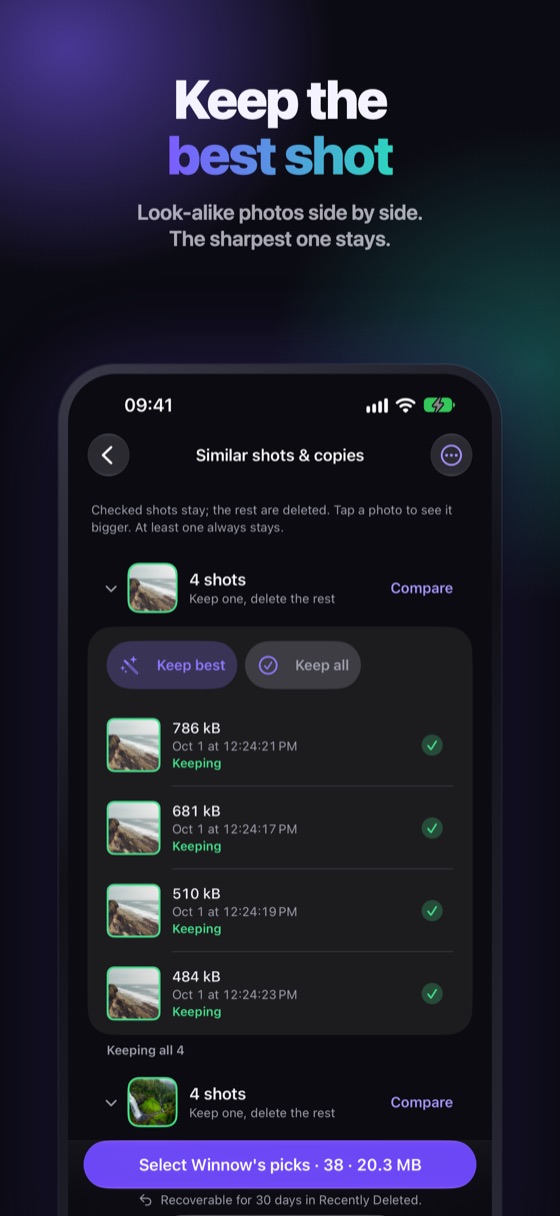
- With a tool that groups them. The point is to compare them next to each other and keep the sharpest.
A simple rule for what to keep
- Keep the sharpest one, with eyes open.
- If two are equal, keep the one that is better framed.
- Always keep at least one of every group.
- Never touch Favorites without checking them yourself.
Empty the Recently Deleted album when you are done. Deleted duplicates keep using space for up to 30 days until they leave it.
Winnow groups the look-alikes for you
Winnow checks similar photos visually, on your iPhone, not by guessing from the time they were taken. Compare each group side by side, tap Keep best and the sharpest shot stays. At least one photo of every group always stays, Favorites are never suggested, and every delete is recoverable for 30 days in Recently Deleted.
FAQ
Can I delete duplicate photos on iPhone without an app?
Yes, for exact copies: Photos › Albums › Utilities › Duplicates (iOS 16 and later). For look-alike shots you still have to compare and choose by hand or with an app.
Does merging duplicates delete my photos?
Merging keeps the best version and moves the others to Recently Deleted, where they stay for 30 days before iOS removes them for good.
Will I lose quality if I keep only one?
You keep the version that is highest quality in the group. Winnow also keeps the sharpest shot by default, and you can change the choice before you delete.